How to find the Correct Battery?
Method to Find the Correct Battery
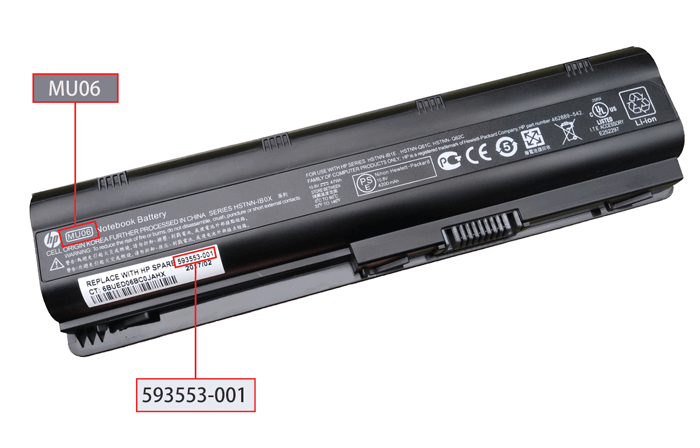
How to locate Battery Part Number
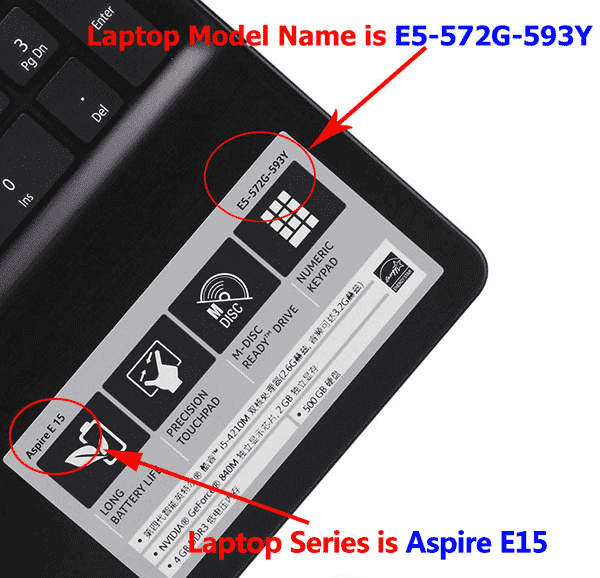
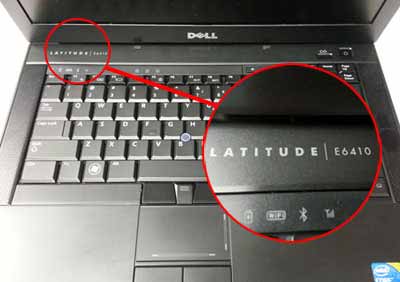
How to locate Laptop Model Name
Still Cannot Find? Please Click for Help
Battery Part Number Identification
A part number is a unique identifier that is assigned to a part to simplify referencing and to unambiguously define a part within a single manufacturer. Knowing about part number of the battery will more accessible to buy a correct battery, and it is comparatively accurate to search a battery by its part number than the model name of laptop.
Here are two examples of identification via Battery Part Number.

Laptop Model Name Identification
This is the easiest and the most direct way of locating the Model Name/Number of your device. Follow the steps given below to get your model as well as product number:
1. In most of the laptops, the label containing the information is located on the lower side of the device. To locate it, first of all, unplug the laptop from any AC cable and shut it down.
2. Reverse your laptop and keep it in a safe place.
3. On the base of the laptop, you may see a label where an icon of your computer manufacturer is printed.
Here are three examples of identification via Laptop Model Name.
Example 1: On or near the keyboard
Example 2: On the back of the notebook

Example 3: Near the power button
Efficient Search Method
After knowing your Laptop Model Name or Battery Part Number, you can search directly on our website.

Tips:
1. There is no need to type the word "Brand"(eg HP, Acer, etc.) or "battery" in your search. This search function is for exact match only.
2. Make sure all words are spelled correctly, or try more general or different keywords.
3. Try to broaden your search by using fewer keywords.
4. If you still have not found the model you want, please click here to fill in the form for help. We will reply to you as soon as possible.